Talking to My Google Drive Files from Telegram
I wanted to ask questions about my Google Drive files and get answers straight in Telegram — no browser, no copy-pasting, no friction. What started as a weekend experiment is now one of my favourite workflows running on my Hostinger VPS. The only cost? The Google Gemini API. Pinecone's free tier handles the vector storage, and n8n is already self-hosted.
We'll cover:
- How RAG works in my workflow
- Two n8n workflows: ingestion and the AI agent
- Step-by-step setup from zero
- A real demo — my bot answering questions about my own resume
Let's get into it.
What Is RAG?
RAG (Retrieval-Augmented Generation) gives an AI model a personal library. Before answering, it retrieves relevant chunks from your documents and passes them to the model with your question. The model answers based on your actual content — not generic training data.
Here's how the pieces map together in this setup:
- Drive is the library
- Pinecone is the index
- Gemini is the brain
- Telegram is the interface
No fine-tuning, no custom model training. Just smart retrieval wired to a capable model.
The Two Workflows
This whole thing runs on two n8n workflows. One handles ingestion (getting your documents into Pinecone), and the other is the live agent that responds to your Telegram messages.
Workflow 1 — Data Ingestion (Google Drive → Pinecone)
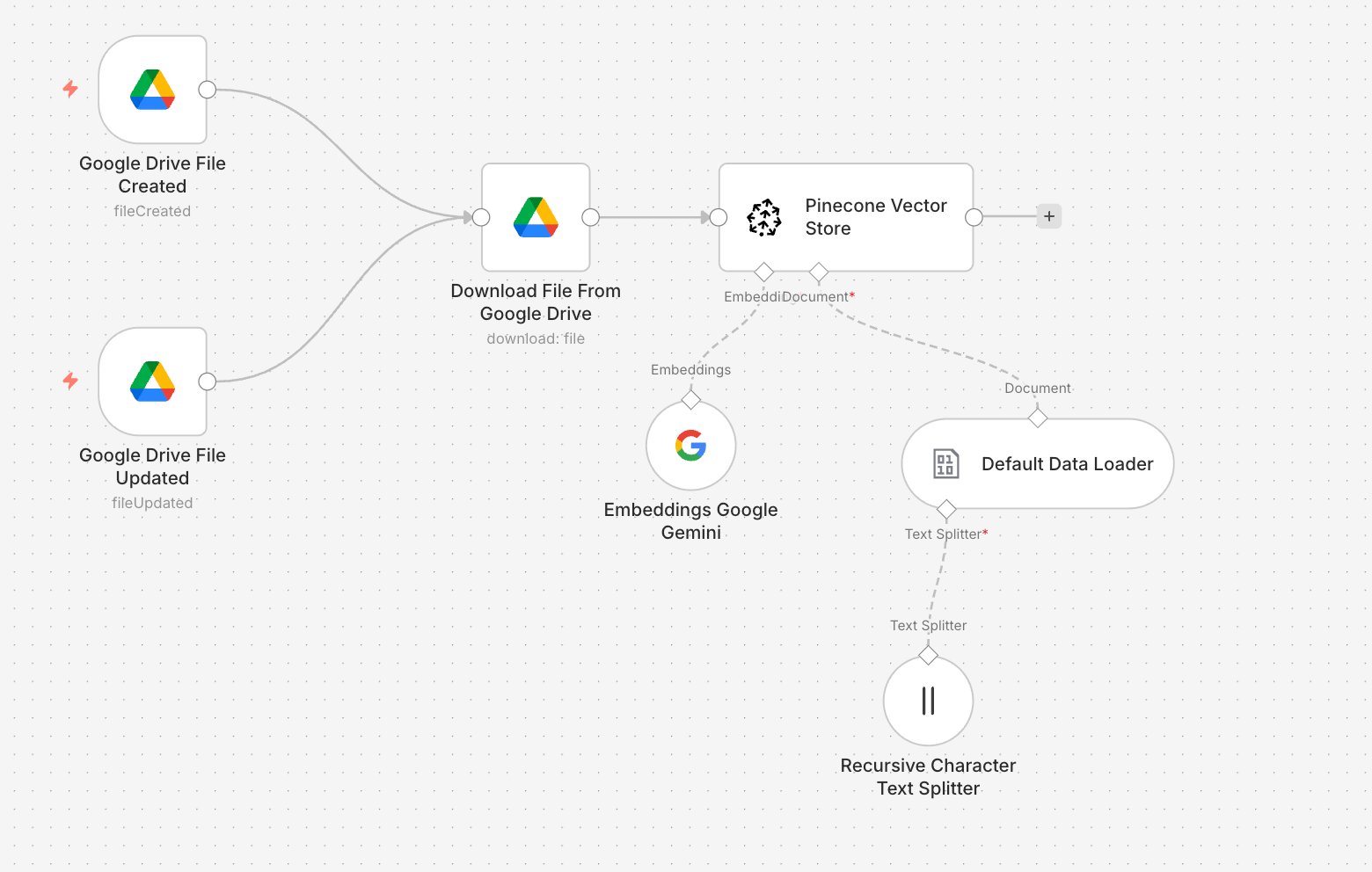
Triggers on Google Drive file create/update → Downloads file → Chunks text → Embeds with Gemini → Stores in Pinecone
Every time you add or update a file in Drive, this workflow kicks off automatically and keeps your Pinecone index fresh.
Workflow 2 — Data Retrieval (Telegram → AI Agent → Reply)
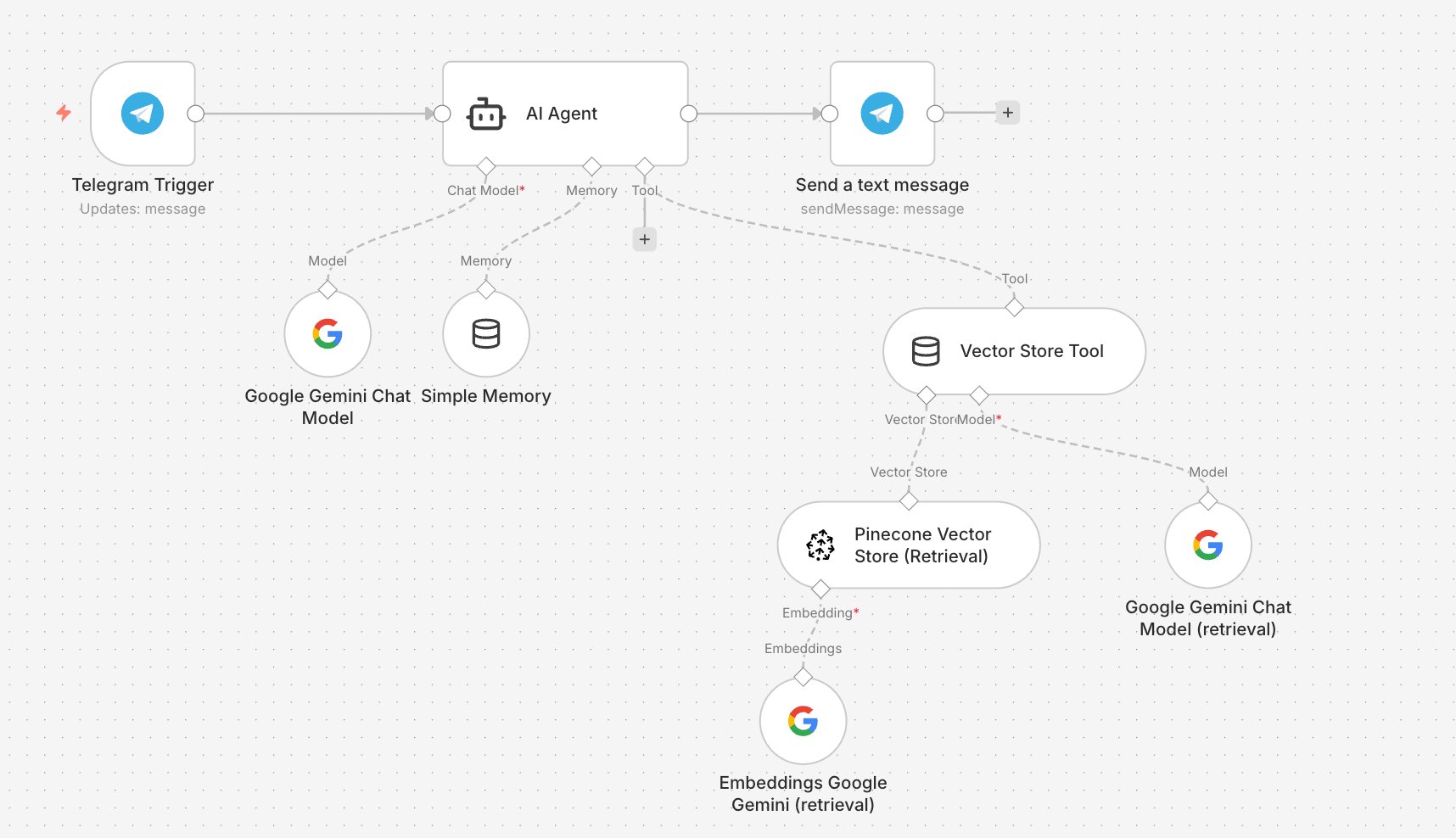
Telegram message → AI Agent (Gemini + Memory) → Vector Store Tool searches Pinecone → Answer sent back to Telegram
This is the live agent. It receives your message, decides when to query Pinecone, and sends back a grounded answer — all within the same Telegram thread.
How Each Workflow Works
Ingestion
- Google Drive Trigger — fires on
fileCreatedorfileUpdated - Default Data Loader + Text Splitter — reads the file, splits into ~500-char chunks with overlap
- Embeddings Google Gemini — converts chunks to 768-dimension vectors
- Pinecone Vector Store — stores vectors for semantic search
RAG Agent
- Telegram Trigger — receives your message
- AI Agent — powered by Gemini Chat Model with Simple Memory for conversation history
- Vector Store Tool — the agent calls this to search Pinecone with an embedded version of your query
- Send Text Message — returns the grounded answer to your Telegram chat
The key thing here is the Vector Store Tool. By exposing Pinecone as a tool rather than a fixed retrieval step, the AI Agent decides when to search — which means it handles multi-turn questions and follow-ups naturally.
Setting It Up
- Pinecone: Create a free index at pinecone.io. Set the dimension to match your Gemini embedding model's output dimension — check both values before creating the index. Set metric to
cosine. - Gemini API: Get your key at aistudio.google.com. Used for both the Chat Model and Embeddings nodes.
- Telegram Bot: Create via @BotFather, copy the token. Add it to the Telegram Trigger and Send Message nodes.
- Ingestion Workflow: Connect Drive credentials, add your Gemini key to the embeddings node, add your Pinecone key + index name. Activate.
- Agent Workflow: Wire Gemini Chat Model + Simple Memory to the AI Agent. Add the Vector Store Tool with Pinecone (retrieval mode) + a dedicated Embeddings node. Connect the output to Telegram.
- Test: Drop a file into Drive, wait for ingestion, then ask your bot a question about it.
See It in Action
Here's a real conversation with my bot, mydrivebot. I uploaded my resume to Google Drive — then asked about it from Telegram:
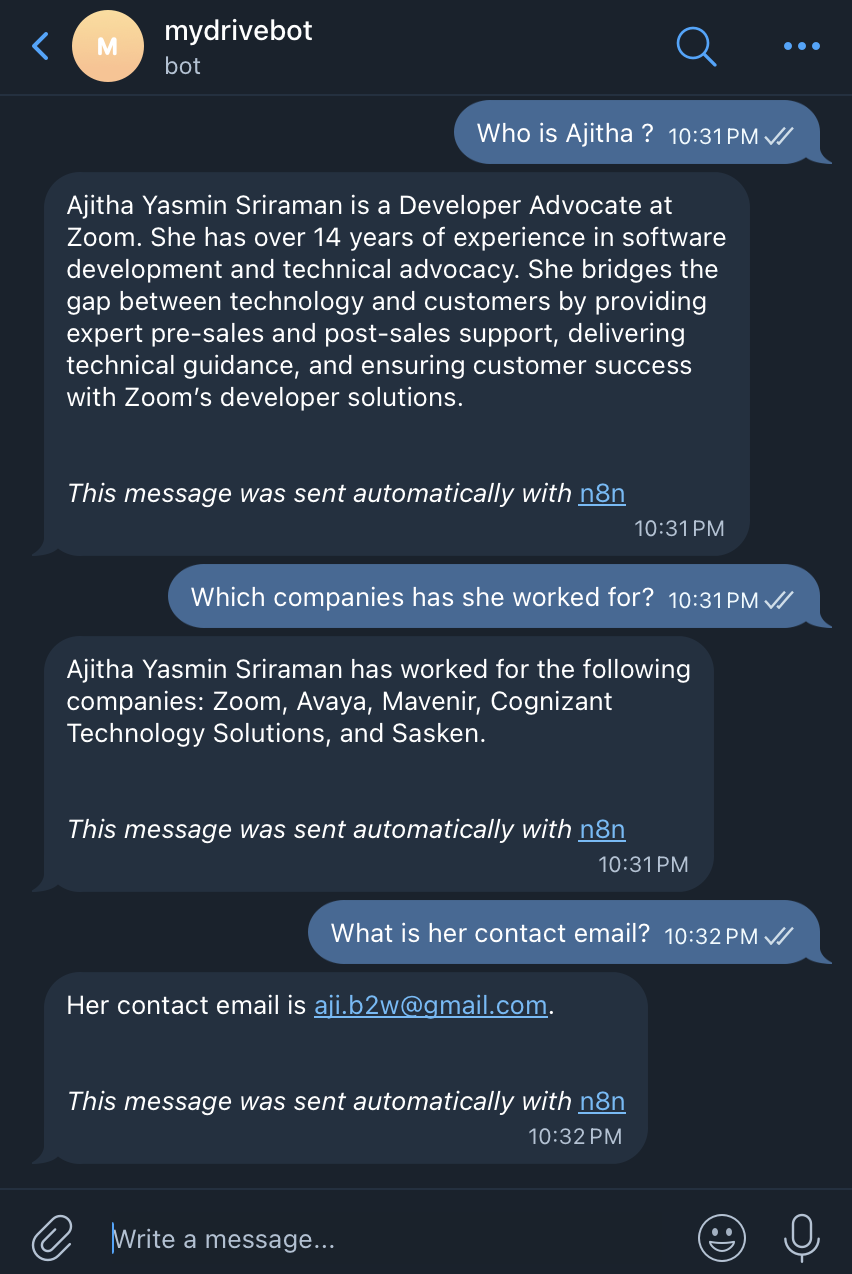
The bot correctly identified my role at Zoom, previous positions at Avaya and Mavenir, and listed my skillsets — all retrieved directly from the document I uploaded. No hardcoded answers, no hallucination. Pure retrieval.
What This Costs
- n8n on Hostinger VPS — $0 extra (already running)
- Pinecone — $0 (free tier, one index, 2GB storage)
- Telegram — $0
- Google Gemini API — the only real cost, minimal for personal use with a free tier to start
For a personal knowledge assistant, this is about as lean as it gets.
Quick Tips
Keep chunk size around 500 chars with ~50 char overlap for precise retrieval. Go too large and you lose specificity; too small and you lose context.
Pinecone dimension must match your embedding model. Before creating your index, check the output dimension of the Gemini embedding model you're using and set Pinecone to the same value. Mismatching this is the most common setup error.
Use the Vector Store Tool, not a direct retrieval node. This lets the agent decide when to search, which makes multi-turn conversations dramatically better.
Simple Memory is enough for personal use. It handles follow-up questions well without adding any infrastructure complexity.
Final Thoughts
What I love about this setup is how self-contained it feels. Google Drive, Pinecone, Gemini, Telegram, and n8n on my own VPS — no SaaS subscriptions, no vendor lock-in, no data leaving my control (except for the Gemini API call). If you're already self-hosting n8n, this is a genuinely low-effort weekend project. The hardest part is getting the Pinecone dimension right the first time.
Happy building!